 |
ACloudViewer
3.9.4
A Modern Library for 3D Data Processing
|
|
ACloudViewer
3.9.4
A Modern Library for 3D Data Processing
|
The abstract base class for all data representing objects in a plot. More...
#include <qcustomplot.h>
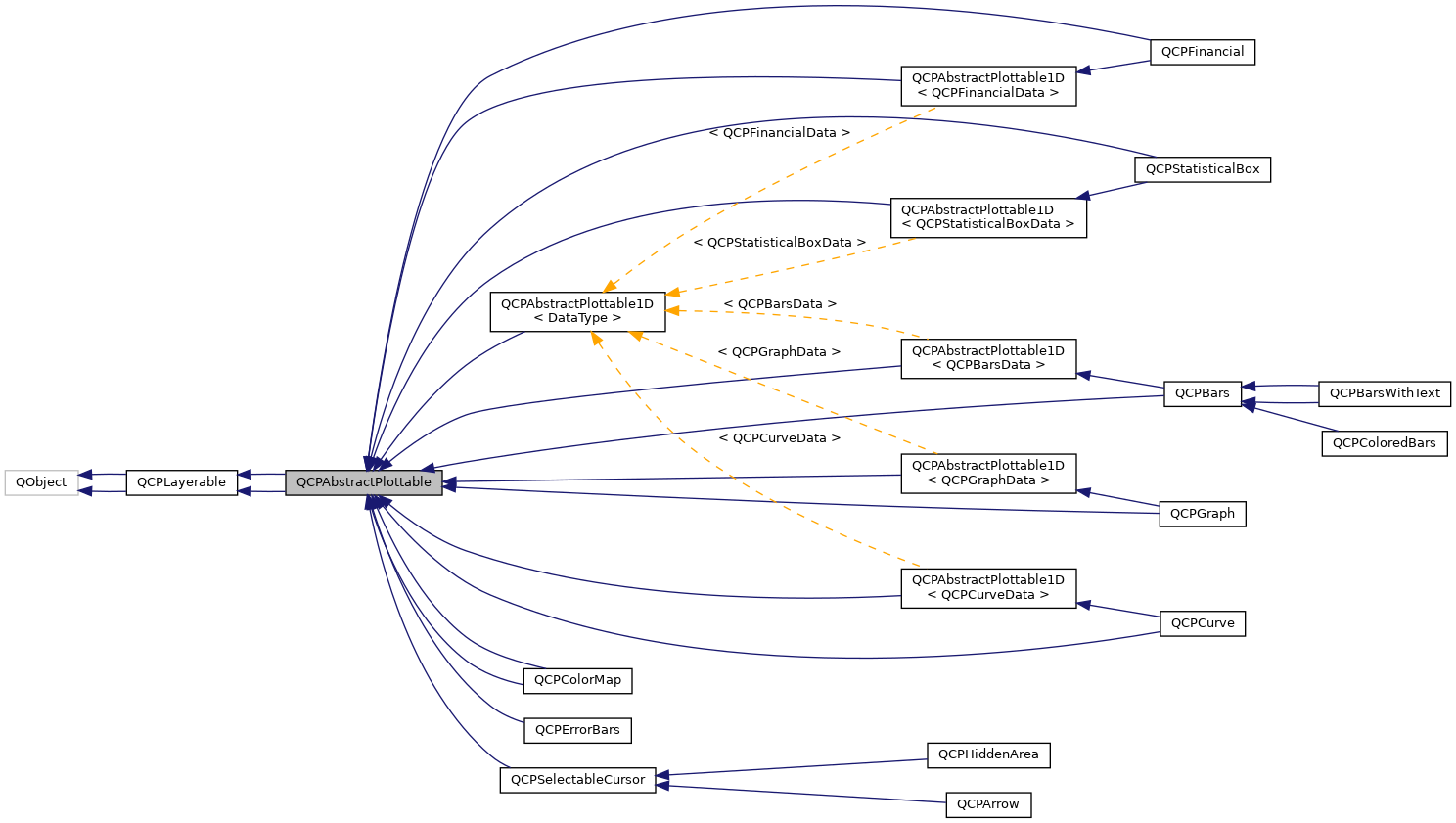
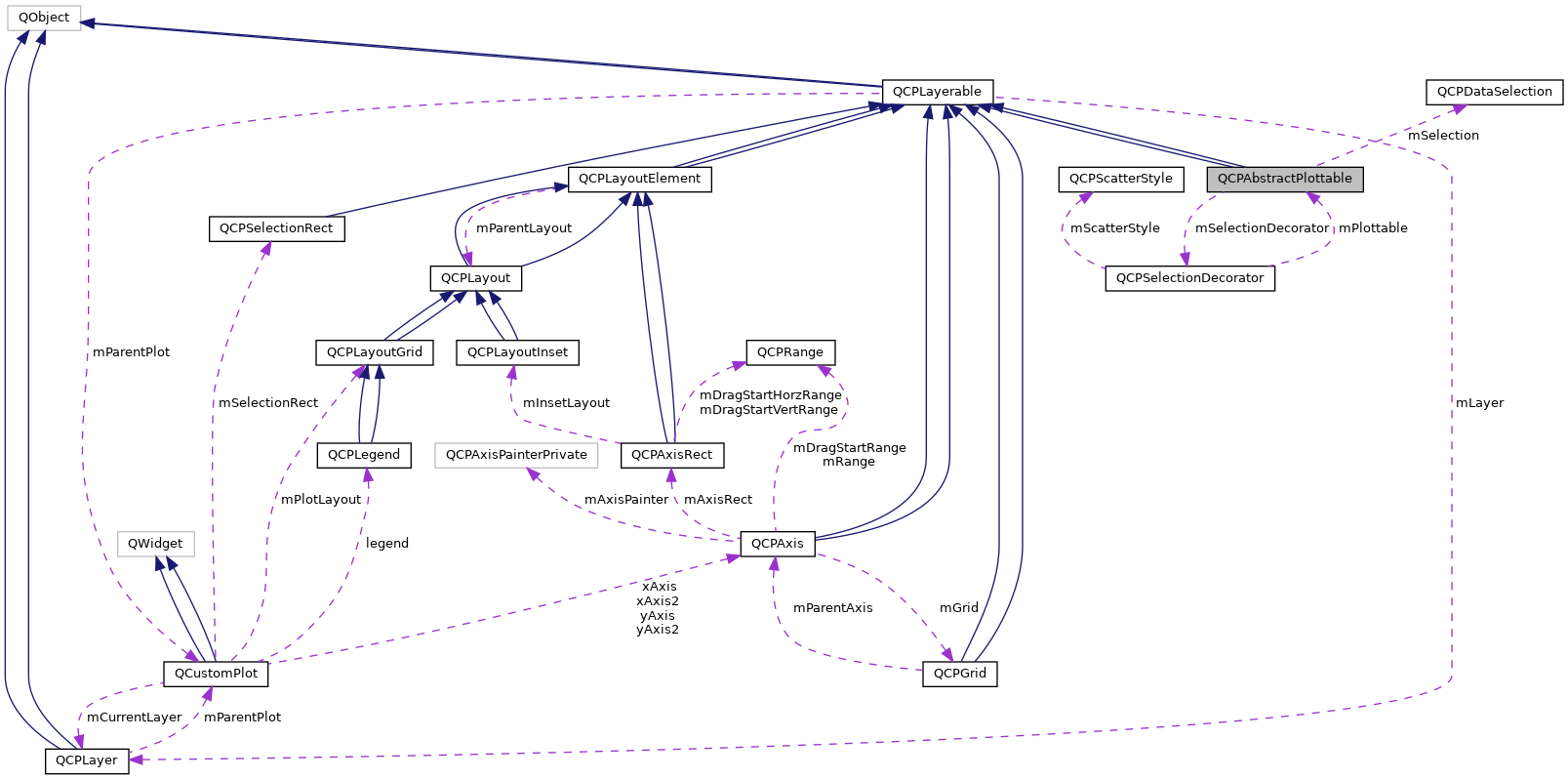
Signals | |
| void | selectionChanged (bool selected) |
| void | selectionChanged (const QCPDataSelection &selection) |
| void | selectableChanged (QCP::SelectionType selectable) |
| void | selectionChanged (bool selected) |
| void | selectableChanged (bool selectable) |
 Signals inherited from QCPLayerable Signals inherited from QCPLayerable | |
| void | layerChanged (QCPLayer *newLayer) |
| void | layerChanged (QCPLayer *newLayer) |
Public Member Functions | |
| QCPAbstractPlottable (QCPAxis *keyAxis, QCPAxis *valueAxis) | |
| virtual | ~QCPAbstractPlottable () |
| QString | name () const |
| bool | antialiasedFill () const |
| bool | antialiasedScatters () const |
| QPen | pen () const |
| QBrush | brush () const |
| QCPAxis * | keyAxis () const |
| QCPAxis * | valueAxis () const |
| QCP::SelectionType | selectable () const |
| bool | selected () const |
| QCPDataSelection | selection () const |
| QCPSelectionDecorator * | selectionDecorator () const |
| void | setName (const QString &name) |
| void | setAntialiasedFill (bool enabled) |
| void | setAntialiasedScatters (bool enabled) |
| void | setPen (const QPen &pen) |
| void | setBrush (const QBrush &brush) |
| void | setKeyAxis (QCPAxis *axis) |
| void | setValueAxis (QCPAxis *axis) |
| Q_SLOT void | setSelectable (QCP::SelectionType selectable) |
| Q_SLOT void | setSelection (QCPDataSelection selection) |
| void | setSelectionDecorator (QCPSelectionDecorator *decorator) |
| virtual double | selectTest (const QPointF &pos, bool onlySelectable, QVariant *details=0) const =0 |
| virtual QCPPlottableInterface1D * | interface1D () |
| virtual QCPRange | getKeyRange (bool &foundRange, QCP::SignDomain inSignDomain=QCP::sdBoth) const =0 |
| virtual QCPRange | getValueRange (bool &foundRange, QCP::SignDomain inSignDomain=QCP::sdBoth, const QCPRange &inKeyRange=QCPRange()) const =0 |
| void | coordsToPixels (double key, double value, double &x, double &y) const |
| const QPointF | coordsToPixels (double key, double value) const |
| void | pixelsToCoords (double x, double y, double &key, double &value) const |
| void | pixelsToCoords (const QPointF &pixelPos, double &key, double &value) const |
| void | rescaleAxes (bool onlyEnlarge=false) const |
| void | rescaleKeyAxis (bool onlyEnlarge=false) const |
| void | rescaleValueAxis (bool onlyEnlarge=false, bool inKeyRange=false) const |
| bool | addToLegend (QCPLegend *legend) |
| bool | addToLegend () |
| bool | removeFromLegend (QCPLegend *legend) const |
| bool | removeFromLegend () const |
| QCPAbstractPlottable (QCPAxis *keyAxis, QCPAxis *valueAxis) | |
| QString | name () const |
| bool | antialiasedFill () const |
| bool | antialiasedScatters () const |
| bool | antialiasedErrorBars () const |
| QPen | pen () const |
| QPen | selectedPen () const |
| QBrush | brush () const |
| QBrush | selectedBrush () const |
| QCPAxis * | keyAxis () const |
| QCPAxis * | valueAxis () const |
| bool | selectable () const |
| bool | selected () const |
| void | setName (const QString &name) |
| void | setAntialiasedFill (bool enabled) |
| void | setAntialiasedScatters (bool enabled) |
| void | setAntialiasedErrorBars (bool enabled) |
| void | setPen (const QPen &pen) |
| void | setSelectedPen (const QPen &pen) |
| void | setBrush (const QBrush &brush) |
| void | setSelectedBrush (const QBrush &brush) |
| void | setKeyAxis (QCPAxis *axis) |
| void | setValueAxis (QCPAxis *axis) |
| Q_SLOT void | setSelectable (bool selectable) |
| Q_SLOT void | setSelected (bool selected) |
| virtual void | clearData ()=0 |
| virtual double | selectTest (const QPointF &pos, bool onlySelectable, QVariant *details=0) const =0 |
| virtual bool | addToLegend () |
| virtual bool | removeFromLegend () const |
| void | rescaleAxes (bool onlyEnlarge=false) const |
| void | rescaleKeyAxis (bool onlyEnlarge=false) const |
| void | rescaleValueAxis (bool onlyEnlarge=false) const |
| Public Member Functions inherited from QCPLayerable | |
| QCPLayerable (QCustomPlot *plot, QString targetLayer=QString(), QCPLayerable *parentLayerable=0) | |
| virtual | ~QCPLayerable () |
| bool | visible () const |
| QCustomPlot * | parentPlot () const |
| QCPLayerable * | parentLayerable () const |
| QCPLayer * | layer () const |
| bool | antialiased () const |
| void | setVisible (bool on) |
| Q_SLOT bool | setLayer (QCPLayer *layer) |
| bool | setLayer (const QString &layerName) |
| void | setAntialiased (bool enabled) |
| bool | realVisibility () const |
| QCPLayerable (QCustomPlot *plot, QString targetLayer=QString(), QCPLayerable *parentLayerable=0) | |
| ~QCPLayerable () | |
| bool | visible () const |
| QCustomPlot * | parentPlot () const |
| QCPLayerable * | parentLayerable () const |
| QCPLayer * | layer () const |
| bool | antialiased () const |
| void | setVisible (bool on) |
| Q_SLOT bool | setLayer (QCPLayer *layer) |
| bool | setLayer (const QString &layerName) |
| void | setAntialiased (bool enabled) |
| bool | realVisibility () const |
Protected Types | |
| enum | SignDomain { sdNegative , sdBoth , sdPositive } |
Protected Member Functions | |
| virtual QRect | clipRect () const |
| virtual void | draw (QCPPainter *painter)=0 |
| virtual QCP::Interaction | selectionCategory () const |
| void | applyDefaultAntialiasingHint (QCPPainter *painter) const |
| virtual void | selectEvent (QMouseEvent *event, bool additive, const QVariant &details, bool *selectionStateChanged) |
| virtual void | deselectEvent (bool *selectionStateChanged) |
| virtual void | drawLegendIcon (QCPPainter *painter, const QRectF &rect) const =0 |
| void | applyFillAntialiasingHint (QCPPainter *painter) const |
| void | applyScattersAntialiasingHint (QCPPainter *painter) const |
| virtual QRect | clipRect () const |
| virtual void | draw (QCPPainter *painter)=0 |
| virtual QCP::Interaction | selectionCategory () const |
| void | applyDefaultAntialiasingHint (QCPPainter *painter) const |
| virtual void | selectEvent (QMouseEvent *event, bool additive, const QVariant &details, bool *selectionStateChanged) |
| virtual void | deselectEvent (bool *selectionStateChanged) |
| virtual void | drawLegendIcon (QCPPainter *painter, const QRectF &rect) const =0 |
| virtual QCPRange | getKeyRange (bool &foundRange, SignDomain inSignDomain=sdBoth) const =0 |
| virtual QCPRange | getValueRange (bool &foundRange, SignDomain inSignDomain=sdBoth) const =0 |
| void | coordsToPixels (double key, double value, double &x, double &y) const |
| const QPointF | coordsToPixels (double key, double value) const |
| void | pixelsToCoords (double x, double y, double &key, double &value) const |
| void | pixelsToCoords (const QPointF &pixelPos, double &key, double &value) const |
| QPen | mainPen () const |
| QBrush | mainBrush () const |
| void | applyFillAntialiasingHint (QCPPainter *painter) const |
| void | applyScattersAntialiasingHint (QCPPainter *painter) const |
| void | applyErrorBarsAntialiasingHint (QCPPainter *painter) const |
| double | distSqrToLine (const QPointF &start, const QPointF &end, const QPointF &point) const |
| Protected Member Functions inherited from QCPLayerable | |
| virtual void | parentPlotInitialized (QCustomPlot *parentPlot) |
| virtual void | mousePressEvent (QMouseEvent *event, const QVariant &details) |
| virtual void | mouseMoveEvent (QMouseEvent *event, const QPointF &startPos) |
| virtual void | mouseReleaseEvent (QMouseEvent *event, const QPointF &startPos) |
| virtual void | mouseDoubleClickEvent (QMouseEvent *event, const QVariant &details) |
| virtual void | wheelEvent (QWheelEvent *event) |
| void | initializeParentPlot (QCustomPlot *parentPlot) |
| void | setParentLayerable (QCPLayerable *parentLayerable) |
| bool | moveToLayer (QCPLayer *layer, bool prepend) |
| void | applyAntialiasingHint (QCPPainter *painter, bool localAntialiased, QCP::AntialiasedElement overrideElement) const |
| virtual void | parentPlotInitialized (QCustomPlot *parentPlot) |
| void | initializeParentPlot (QCustomPlot *parentPlot) |
| void | setParentLayerable (QCPLayerable *parentLayerable) |
| bool | moveToLayer (QCPLayer *layer, bool prepend) |
| void | applyAntialiasingHint (QCPPainter *painter, bool localAntialiased, QCP::AntialiasedElement overrideElement) const |
Protected Attributes | |
| QString | mName |
| bool | mAntialiasedFill |
| bool | mAntialiasedScatters |
| QPen | mPen |
| QBrush | mBrush |
| QPointer< QCPAxis > | mKeyAxis |
| QPointer< QCPAxis > | mValueAxis |
| QCP::SelectionType | mSelectable |
| QCPDataSelection | mSelection |
| QCPSelectionDecorator * | mSelectionDecorator |
| bool | mAntialiasedErrorBars |
| QPen | mSelectedPen |
| QBrush | mSelectedBrush |
| bool | mSelectable |
| bool | mSelected |
| Protected Attributes inherited from QCPLayerable | |
| bool | mVisible |
| QCustomPlot * | mParentPlot |
| QPointer< QCPLayerable > | mParentLayerable |
| QCPLayer * | mLayer |
| bool | mAntialiased |
The abstract base class for all data representing objects in a plot.
It defines a very basic interface like name, pen, brush, visibility etc. Since this class is abstract, it can't be instantiated. Use one of the subclasses or create a subclass yourself to create new ways of displaying data (see "Creating own plottables" below). Plottables that display one-dimensional data (i.e. data points have a single key dimension and one or multiple values at each key) are based off of the template subclass QCPAbstractPlottable1D, see details there.
All further specifics are in the subclasses, for example:
Subclassing directly from QCPAbstractPlottable is only recommended if you wish to display two-dimensional data like QCPColorMap, i.e. two logical key dimensions and one (or more) data dimensions. If you want to display data with only one logical key dimension, you should rather derive from QCPAbstractPlottable1D.
If subclassing QCPAbstractPlottable directly, these are the pure virtual functions you must implement:
See the documentation of those functions for what they need to do.
For drawing your plot, you can use the coordsToPixels functions to translate a point in plot coordinates to pixel coordinates. This function is quite convenient, because it takes the orientation of the key and value axes into account for you (x and y are swapped when the key axis is vertical and the value axis horizontal). If you are worried about performance (i.e. you need to translate many points in a loop like QCPGraph), you can directly use QCPAxis::coordToPixel. However, you must then take care about the orientation of the axis yourself.
Here are some important members you inherit from QCPAbstractPlottable:
| QCustomPlot *mParentPlot | A pointer to the parent QCustomPlot instance. The parent plot is inferred from the axes that are passed in the constructor. |
| QString mName | The name of the plottable. |
| QPen mPen | The generic pen of the plottable. You should use this pen for the most prominent data representing lines in the plottable (e.g QCPGraph uses this pen for its graph lines and scatters) |
| QBrush mBrush | The generic brush of the plottable. You should use this brush for the most prominent fillable structures in the plottable (e.g. QCPGraph uses this brush to control filling under the graph) |
| QPointer<QCPAxis> mKeyAxis, mValueAxis | The key and value axes this plottable is attached to. Call their QCPAxis::coordToPixel functions to translate coordinates to pixels in either the key or value dimension. Make sure to check whether the pointer is null before using it. If one of the axes is null, don't draw the plottable. |
| QCPSelectionDecorator mSelectionDecorator | The currently set selection decorator which specifies how selected data of the plottable shall be drawn and decorated. When drawing your data, you must consult this decorator for the appropriate pen/brush before drawing unselected/selected data segments. Finally, you should call its QCPSelectionDecorator::drawDecoration method at the end of your draw implementation. |
| QCP::SelectionType mSelectable | In which composition, if at all, this plottable's data may be selected. Enforcing this setting on the data selection is done by QCPAbstractPlottable automatically. |
| QCPDataSelection mSelection | Holds the current selection state of the plottable's data, i.e. the selected data ranges (QCPDataRange). |
It defines a very basic interface like name, pen, brush, visibility etc. Since this class is abstract, it can't be instantiated. Use one of the subclasses or create a subclass yourself to create new ways of displaying data (see "Creating own plottables" below).
All further specifics are in the subclasses, for example:
To create an own plottable, you implement a subclass of QCPAbstractPlottable. These are the pure virtual functions, you must implement:
See the documentation of those functions for what they need to do.
For drawing your plot, you can use the coordsToPixels functions to translate a point in plot coordinates to pixel coordinates. This function is quite convenient, because it takes the orientation of the key and value axes into account for you (x and y are swapped when the key axis is vertical and the value axis horizontal). If you are worried about performance (i.e. you need to translate many points in a loop like QCPGraph), you can directly use QCPAxis::coordToPixel. However, you must then take care about the orientation of the axis yourself.
Here are some important members you inherit from QCPAbstractPlottable:
| QCustomPlot *mParentPlot | A pointer to the parent QCustomPlot instance. The parent plot is inferred from the axes that are passed in the constructor. |
| QString mName | The name of the plottable. |
| QPen mPen | The generic pen of the plottable. You should use this pen for the most prominent data representing lines in the plottable (e.g QCPGraph uses this pen for its graph lines and scatters) |
| QPen mSelectedPen | The generic pen that should be used when the plottable is selected (hint: mainPen gives you the right pen, depending on selection state). |
| QBrush mBrush | The generic brush of the plottable. You should use this brush for the most prominent fillable structures in the plottable (e.g. QCPGraph uses this brush to control filling under the graph) |
| QBrush mSelectedBrush | The generic brush that should be used when the plottable is selected (hint: mainBrush gives you the right brush, depending on selection state). |
| QPointer<QCPAxis>mKeyAxis, mValueAxis | The key and value axes this plottable is attached to. Call their QCPAxis::coordToPixel functions to translate coordinates to pixels in either the key or value dimension. Make sure to check whether the pointer is null before using it. If one of the axes is null, don't draw the plottable. |
| bool mSelected | indicates whether the plottable is selected or not. |
Definition at line 3816 of file qcustomplot.h.
|
protected |
Represents negative and positive sign domain for passing to getKeyRange and getValueRange.
Definition at line 1749 of file qcustomplot.h.
Constructs an abstract plottable which uses keyAxis as its key axis ("x") and valueAxis as its value axis ("y"). keyAxis and valueAxis must reside in the same QCustomPlot instance and have perpendicular orientations. If either of these restrictions is violated, a corresponding message is printed to the debug output (qDebug), the construction is not aborted, though.
Since QCPAbstractPlottable is an abstract class that defines the basic interface to plottables, it can't be directly instantiated.
You probably want one of the subclasses like QCPGraph or QCPCurve instead.
Definition at line 11099 of file qcustomplot.cpp.
References keyAxis(), QCPLayerable::mParentPlot, QCPAxis::orientation(), QCPLayerable::parentPlot(), QCustomPlot::registerPlottable(), setSelectionDecorator(), and valueAxis().
|
virtual |
Definition at line 11122 of file qcustomplot.cpp.
References mSelectionDecorator.
| bool QCPAbstractPlottable::addToLegend | ( | ) |
This is an overloaded member function, provided for convenience. It differs from the above function only in what argument(s) it accepts.
Adds this plottable to the legend of the parent QCustomPlot (QCustomPlot::legend).
Adds this plottable to the legend of the parent QCustomPlot (QCustomPlot::legend).
Normally, a QCPPlottableLegendItem is created and inserted into the legend. If the plottable needs a more specialized representation in the legend, this function will take this into account and instead create the specialized subclass of QCPAbstractLegendItem.
Returns true on success, i.e. when the legend exists and a legend item associated with this plottable isn't already in the legend.
Definition at line 11540 of file qcustomplot.cpp.
References QCustomPlot::legend, and QCPLayerable::mParentPlot.
|
virtual |
| bool QCPAbstractPlottable::addToLegend | ( | QCPLegend * | legend | ) |
This is an overloaded member function, provided for convenience. It differs from the above function only in what argument(s) it accepts.
Adds this plottable to the specified legend.
Creates a QCPPlottableLegendItem which is inserted into the legend. Returns true on success, i.e. when the legend exists and a legend item associated with this plottable isn't already in the legend.
If the plottable needs a more specialized representation in the legend, you can create a corresponding subclass of QCPPlottableLegendItem and add it to the legend manually instead of calling this method.
Definition at line 11514 of file qcustomplot.cpp.
References QCPLegend::addItem(), QCPLegend::hasItemWithPlottable(), QCPLayerable::mParentPlot, QCPLayerable::parentPlot(), and QCPPlottableLegendItem.
Referenced by QCustomPlot::addPlottable(), and QCustomPlot::registerPlottable().
|
inline |
Definition at line 1703 of file qcustomplot.h.
|
inline |
Definition at line 3841 of file qcustomplot.h.
|
inline |
Definition at line 1701 of file qcustomplot.h.
|
inline |
Definition at line 3842 of file qcustomplot.h.
|
inline |
Definition at line 1702 of file qcustomplot.h.
|
protectedvirtual |
Implements QCPLayerable.
Definition at line 11612 of file qcustomplot.cpp.
References QCP::aePlottables, QCPLayerable::applyAntialiasingHint(), and QCPLayerable::mAntialiased.
Referenced by QCPColoredBars::draw(), QCPBars::draw(), QCPColorMap::draw(), QCPErrorBars::draw(), QCPCurve::drawCurveLine(), QCPGraph::drawImpulsePlot(), QCPGraph::drawLegendIcon(), QCPCurve::drawLegendIcon(), QCPBars::drawLegendIcon(), QCPStatisticalBox::drawLegendIcon(), QCPColorMap::drawLegendIcon(), QCPErrorBars::drawLegendIcon(), QCPGraph::drawLinePlot(), QCPStatisticalBox::drawMedian(), QCPStatisticalBox::drawQuartileBox(), and QCPStatisticalBox::drawStatisticalBox().
|
protectedvirtual |
Implements QCPLayerable.
|
protected |
Definition at line 7592 of file qcustomplot.cpp.
References QCP::aeErrorBars, QCPLayerable::applyAntialiasingHint(), and mAntialiasedErrorBars.
Referenced by QCPGraph::drawScatterPlot(), and QCPStatisticalBox::drawWhiskers().
|
protected |
Definition at line 11629 of file qcustomplot.cpp.
References QCP::aeFills, QCPLayerable::applyAntialiasingHint(), and mAntialiasedFill.
Referenced by QCPColoredBars::draw(), QCPHiddenArea::draw(), QCPCurve::draw(), QCPGraph::drawFill(), QCPGraph::drawLegendIcon(), and QCPCurve::drawLegendIcon().
|
protected |
|
protected |
Definition at line 11645 of file qcustomplot.cpp.
References QCP::aeScatters, QCPLayerable::applyAntialiasingHint(), and mAntialiasedScatters.
Referenced by QCPGraph::drawLegendIcon(), QCPCurve::drawLegendIcon(), QCPStatisticalBox::drawOutliers(), QCPCurve::drawScatterPlot(), QCPGraph::drawScatterPlot(), and QCPStatisticalBox::drawStatisticalBox().
|
protected |
|
inline |
Definition at line 3844 of file qcustomplot.h.
Referenced by QCPColoredBars::draw(), QCPHiddenArea::draw(), QCPArrow::draw(), setBrush(), QCPFinancial::setBrushNegative(), QCPFinancial::setBrushPositive(), and setSelectedBrush().
|
inline |
Definition at line 1706 of file qcustomplot.h.
|
pure virtual |
Clears all data in the plottable.
Implemented in QCPFinancial, QCPColorMap, QCPStatisticalBox, QCPBars, QCPCurve, QCPGraph, QCPSelectableCursor, and QCPColoredBars.
|
protectedvirtual |
Reimplemented from QCPLayerable.
Definition at line 11583 of file qcustomplot.cpp.
References mKeyAxis, and mValueAxis.
Referenced by QCPHiddenArea::draw(), QCPArrow::draw(), and QCPColoredBars::rect().
|
protectedvirtual |
Reimplemented from QCPLayerable.
| const QPointF QCPAbstractPlottable::coordsToPixels | ( | double | key, |
| double | value | ||
| ) | const |
This is an overloaded member function, provided for convenience. It differs from the above function only in what argument(s) it accepts.
Transforms the given key and value to pixel coordinates and returns them in a QPointF.
Definition at line 11322 of file qcustomplot.cpp.
References QCPAxis::coordToPixel(), keyAxis(), mKeyAxis, mValueAxis, QCPAxis::orientation(), and valueAxis().
|
protected |
| void QCPAbstractPlottable::coordsToPixels | ( | double | key, |
| double | value, | ||
| double & | x, | ||
| double & | y | ||
| ) | const |
Convenience function for transforming a key/value pair to pixels on the QCustomPlot surface, taking the orientations of the axes associated with this plottable into account (e.g. whether key represents x or y).
key and value are transformed to the coodinates in pixels and are written to x and y.
Definition at line 11297 of file qcustomplot.cpp.
References QCPAxis::coordToPixel(), keyAxis(), mKeyAxis, mValueAxis, QCPAxis::orientation(), valueAxis(), x, and y.
Referenced by QCPBarsWithText::draw(), QCPColorMap::draw(), QCPStatisticalBox::drawMedian(), QCPStatisticalBox::drawOutliers(), QCPStatisticalBox::drawQuartileBox(), QCPStatisticalBox::drawStatisticalBox(), QCPStatisticalBox::drawWhiskers(), QCPCurve::getCurveData(), QCPCurve::getCurveLines(), QCPCurve::getOptimizedCornerPoints(), QCPStatisticalBox::getQuartileBox(), QCPCurve::getTraverseCornerPoints(), QCPStatisticalBox::getWhiskerBackboneLines(), QCPStatisticalBox::getWhiskerBarLines(), QCPCurve::pointDistance(), and QCPGraph::pointDistance().
|
protected |
|
protectedvirtual |
Reimplemented from QCPLayerable.
Definition at line 11688 of file qcustomplot.cpp.
References mSelectable, mSelection, setSelection(), and QCP::stNone.
|
protectedvirtual |
Reimplemented from QCPLayerable.
|
protected |
Definition at line 7607 of file qcustomplot.cpp.
References a.
Referenced by QCPFinancial::candlestickSelectTest(), QCPFinancial::ohlcSelectTest(), QCPGraph::pointDistance(), and QCPCurve::pointDistance().
|
protectedpure virtual |
Implements QCPLayerable.
Implemented in QCPBarsWithText, QCPFinancial, QCPColorMap, QCPStatisticalBox, QCPBars, QCPCurve, QCPGraph, QCPErrorBars, QCPFinancial, QCPColorMap, QCPStatisticalBox, QCPBars, QCPCurve, QCPGraph, QCPArrow, QCPHiddenArea, QCPColoredBars, and QCPBarsWithText.
|
protectedpure virtual |
Implements QCPLayerable.
Implemented in QCPBarsWithText, QCPFinancial, QCPColorMap, QCPStatisticalBox, QCPBars, QCPCurve, QCPGraph, QCPErrorBars, QCPFinancial, QCPColorMap, QCPStatisticalBox, QCPBars, QCPCurve, QCPGraph, QCPArrow, QCPHiddenArea, QCPColoredBars, and QCPBarsWithText.
|
protectedpure virtual |
Implemented in QCPSelectableCursor, QCPFinancial, QCPColorMap, QCPStatisticalBox, QCPBars, QCPCurve, QCPGraph, QCPErrorBars, QCPFinancial, QCPColorMap, QCPStatisticalBox, QCPBars, QCPCurve, and QCPGraph.
Referenced by QCPPlottableLegendItem::draw().
|
protectedpure virtual |
Implemented in QCPSelectableCursor, QCPFinancial, QCPColorMap, QCPStatisticalBox, QCPBars, QCPCurve, QCPGraph, QCPErrorBars, QCPFinancial, QCPColorMap, QCPStatisticalBox, QCPBars, QCPCurve, and QCPGraph.
|
pure virtual |
Returns the coordinate range that all data in this plottable span in the key axis dimension. For logarithmic plots, one can set inSignDomain to either QCP::sdNegative or QCP::sdPositive in order to restrict the returned range to that sign domain. E.g. when only negative range is wanted, set inSignDomain to QCP::sdNegative and all positive points will be ignored for range calculation. For no restriction, just set inSignDomain to QCP::sdBoth (default). foundRange is an output parameter that indicates whether a range could be found or not. If this is false, you shouldn't use the returned range (e.g. no points in data).
Note that foundRange is not the same as QCPRange::validRange, since the range returned by this function may have size zero (e.g. when there is only one data point). In this case foundRange would return true, but the returned range is not a valid range in terms of QCPRange::validRange.
Implemented in QCPSelectableCursor, QCPErrorBars, QCPFinancial, QCPColorMap, QCPStatisticalBox, QCPBars, QCPCurve, and QCPGraph.
Referenced by rescaleKeyAxis().
|
protectedpure virtual |
Implemented in QCPFinancial, QCPColorMap, QCPStatisticalBox, QCPBars, QCPCurve, and QCPGraph.
|
pure virtual |
Returns the coordinate range that the data points in the specified key range (inKeyRange) span in the value axis dimension. For logarithmic plots, one can set inSignDomain to either QCP::sdNegative or QCP::sdPositive in order to restrict the returned range to that sign domain. E.g. when only negative range is wanted, set inSignDomain to QCP::sdNegative and all positive points will be ignored for range calculation. For no restriction, just set inSignDomain to QCP::sdBoth (default). foundRange is an output parameter that indicates whether a range could be found or not. If this is false, you shouldn't use the returned range (e.g. no points in data).
If inKeyRange has both lower and upper bound set to zero (is equal to QCPRange()), all data points are considered, without any restriction on the keys.
Note that foundRange is not the same as QCPRange::validRange, since the range returned by this function may have size zero (e.g. when there is only one data point). In this case foundRange would return true, but the returned range is not a valid range in terms of QCPRange::validRange.
Implemented in QCPSelectableCursor, QCPErrorBars, QCPFinancial, QCPColorMap, QCPStatisticalBox, QCPBars, QCPCurve, and QCPGraph.
Referenced by rescaleValueAxis().
|
protectedpure virtual |
called by rescaleAxes functions to get the full data value bounds. For logarithmic plots, one can set inSignDomain to either sdNegative or sdPositive in order to restrict the returned range to that sign domain. E.g. when only negative range is wanted, set inSignDomain to sdNegative and all positive points will be ignored for range calculation. For no restriction, just set inSignDomain to sdBoth (default). foundRange is an output parameter that indicates whether a range could be found or not. If this is false, you shouldn't use the returned range (e.g. no points in data).
Note that foundRange is not the same as QCPRange::validRange, since the range returned by this function may have size zero, which wouldn't count as a valid range.
Implemented in QCPFinancial, QCPColorMap, QCPStatisticalBox, QCPBars, QCPCurve, and QCPGraph.
|
inlinevirtual |
If this plottable is a one-dimensional plottable, i.e. it implements the QCPPlottableInterface1D, returns the this pointer with that type. Otherwise (e.g. in the case of a QCPColorMap) returns zero.
You can use this method to gain read access to data coordinates while holding a pointer to the abstract base class only.
Reimplemented in QCPErrorBars, QCPAbstractPlottable1D< DataType >, QCPAbstractPlottable1D< QCPFinancialData >, QCPAbstractPlottable1D< QCPStatisticalBoxData >, QCPAbstractPlottable1D< QCPGraphData >, QCPAbstractPlottable1D< QCPBarsData >, and QCPAbstractPlottable1D< QCPCurveData >.
Definition at line 3873 of file qcustomplot.h.
Referenced by QCPSelectionDecoratorBracket::drawDecoration(), QCustomPlot::processRectSelection(), and QCPErrorBars::setDataPlottable().
|
inline |
Definition at line 3845 of file qcustomplot.h.
Referenced by QCPFinancial::candlestickSelectTest(), coordsToPixels(), QCPBars::dataPixelPosition(), QCPGraph::dataToImpulseLines(), QCPGraph::dataToLines(), QCPGraph::dataToStepCenterLines(), QCPGraph::dataToStepLeftLines(), QCPGraph::dataToStepRightLines(), QCPHiddenArea::draw(), QCPArrow::draw(), QCPStatisticalBox::draw(), QCPColorMap::draw(), QCPFinancial::drawCandlestickPlot(), QCPSelectionDecoratorBracket::drawDecoration(), QCPGraph::drawError(), QCPGraph::drawFill(), QCPFinancial::drawOhlcPlot(), QCPGraph::drawScatterPlot(), QCPBars::getBarPolygon(), QCPBars::getBarRect(), QCPGraph::getChannelFillPolygon(), QCPCurve::getCurveData(), QCPCurve::getCurveLines(), QCPGraph::getFillBasePoint(), QCPGraph::getImpulsePlotData(), QCPGraph::getLinePlotData(), QCPGraph::getOptimizedLineData(), QCPGraph::getOptimizedScatterData(), QCPSelectionDecoratorBracket::getPixelCoordinates(), QCPGraph::getPreparedData(), QCPGraph::getScatters(), QCPCurve::getScatters(), QCPGraph::getStepCenterPlotData(), QCPGraph::getStepLeftPlotData(), QCPGraph::getStepRightPlotData(), QCPErrorBars::getVisibleDataBounds(), QCPGraph::getVisibleDataBounds(), QCPBarsGroup::keyPixelOffset(), QCPGraph::lowerFillBasePoint(), QCPBars::moveAbove(), QCPBars::moveBelow(), QCPFinancial::ohlcSelectTest(), pixelsToCoords(), QCPSelectableCursor::pixelToKey(), QCustomPlot::plottableAt(), QCPAbstractPlottable(), QCPGraph::rescaleKeyAxis(), rescaleKeyAxis(), rescaleValueAxis(), QCPFinancial::selectionHitBox(), QCPItemTracer::setGraph(), QCPColorMap::updateLegendIcon(), QCPColorMap::updateMapImage(), and QCPGraph::upperFillBasePoint().
|
inline |
Definition at line 1708 of file qcustomplot.h.
|
protected |
Definition at line 7522 of file qcustomplot.cpp.
References mBrush, mSelected, and mSelectedBrush.
Referenced by QCPStatisticalBox::drawQuartileBox().
|
protected |
Definition at line 7513 of file qcustomplot.cpp.
References mPen, mSelected, and mSelectedPen.
Referenced by QCPGraph::drawImpulsePlot(), QCPGraph::drawLinePlot(), QCPStatisticalBox::drawQuartileBox(), and QCPCurve::getCurveData().
|
inline |
Definition at line 3840 of file qcustomplot.h.
Referenced by QCPPlottableLegendItem::draw(), QCPGraph::draw(), QCPCurve::draw(), QCPBars::draw(), QCPStatisticalBox::draw(), QCPErrorBars::draw(), QCPPlottableLegendItem::minimumOuterSizeHint(), QCPPlottableLegendItem::minimumSizeHint(), and setName().
|
inline |
Definition at line 1700 of file qcustomplot.h.
|
inline |
Definition at line 3843 of file qcustomplot.h.
Referenced by QCPColoredBars::draw(), QCPHiddenArea::draw(), QCPArrow::draw(), QCPGraph::drawImpulsePlot(), QCPGraph::setErrorPen(), QCPStatisticalBox::setMedianPen(), setPen(), QCPFinancial::setPenNegative(), QCPFinancial::setPenPositive(), setSelectedPen(), QCPStatisticalBox::setWhiskerBarPen(), QCPStatisticalBox::setWhiskerPen(), ccWaveWidget::updateCurveWidth(), and ccHistogramWindow::updateOverlayCurveWidth().
|
inline |
Definition at line 1704 of file qcustomplot.h.
| void QCPAbstractPlottable::pixelsToCoords | ( | const QPointF & | pixelPos, |
| double & | key, | ||
| double & | value | ||
| ) | const |
This is an overloaded member function, provided for convenience. It differs from the above function only in what argument(s) it accepts.
Returns the pixel input pixelPos as plot coordinates key and value.
Definition at line 11373 of file qcustomplot.cpp.
References pixelsToCoords().
|
protected |
| void QCPAbstractPlottable::pixelsToCoords | ( | double | x, |
| double | y, | ||
| double & | key, | ||
| double & | value | ||
| ) | const |
Convenience function for transforming a x/y pixel pair on the QCustomPlot surface to plot coordinates, taking the orientations of the axes associated with this plottable into account (e.g. whether key represents x or y).
x and y are transformed to the plot coodinates and are written to key and value.
Definition at line 11349 of file qcustomplot.cpp.
References keyAxis(), mKeyAxis, mValueAxis, QCPAxis::orientation(), QCPAxis::pixelToCoord(), valueAxis(), x, and y.
Referenced by QCPFinancial::candlestickSelectTest(), pixelsToCoords(), QCPGraph::pointDistance(), and QCPColorMap::selectTest().
|
protected |
| bool QCPAbstractPlottable::removeFromLegend | ( | ) | const |
This is an overloaded member function, provided for convenience. It differs from the above function only in what argument(s) it accepts.
Removes the plottable from the legend of the parent QCustomPlot.
Removes the plottable from the legend of the parent QCustomPlot. This means the QCPAbstractLegendItem (usually a QCPPlottableLegendItem) that is associated with this plottable is removed.
Returns true on success, i.e. if the legend exists and a legend item associated with this plottable was found and removed.
Definition at line 11575 of file qcustomplot.cpp.
References QCustomPlot::legend, and QCPLayerable::mParentPlot.
|
virtual |
| bool QCPAbstractPlottable::removeFromLegend | ( | QCPLegend * | legend | ) | const |
This is an overloaded member function, provided for convenience. It differs from the above function only in what argument(s) it accepts.
Removes the plottable from the specifed legend. This means the QCPPlottableLegendItem that is associated with this plottable is removed.
Returns true on success, i.e. if the legend exists and a legend item associated with this plottable was found and removed.
Definition at line 11557 of file qcustomplot.cpp.
References QCPLegend::itemWithPlottable(), and QCPLegend::removeItem().
Referenced by QCustomPlot::removePlottable(), and WolmanCustomPlot::WolmanCustomPlot().
| void QCPAbstractPlottable::rescaleAxes | ( | bool | onlyEnlarge = false | ) | const |
Rescales the key and value axes associated with this plottable to contain all displayed data, so the whole plottable is visible. If the scaling of an axis is logarithmic, rescaleAxes will make sure not to rescale to an illegal range i.e. a range containing different signs and/or zero. Instead it will stay in the current sign domain and ignore all parts of the plottable that lie outside of that domain.
onlyEnlarge makes sure the ranges are only expanded, never reduced. So it's possible to show multiple plottables in their entirety by multiple calls to rescaleAxes where the first call has onlyEnlarge set to false (the default), and all subsequent set to true.
Definition at line 11395 of file qcustomplot.cpp.
References rescaleKeyAxis(), and rescaleValueAxis().
Referenced by AnglesCustomPlot::AnglesCustomPlot(), AnglesCustomPlot::rescale(), and WolmanCustomPlot::WolmanCustomPlot().
| void QCPAbstractPlottable::rescaleAxes | ( | bool | onlyEnlarge = false | ) | const |
| void QCPAbstractPlottable::rescaleKeyAxis | ( | bool | onlyEnlarge = false | ) | const |
Rescales the key axis of the plottable so the whole plottable is visible.
See rescaleAxes for detailed behaviour.
Definition at line 11405 of file qcustomplot.cpp.
References QCPRange::expand(), getKeyRange(), keyAxis(), QCPRange::lower, mKeyAxis, QCPAxis::range(), QCPAxis::scaleType(), QCP::sdBoth, QCP::sdNegative, QCP::sdPositive, QCPAxis::setRange(), QCPRange::size(), QCPAxis::stLinear, QCPAxis::stLogarithmic, QCPRange::upper, and QCPRange::validRange().
Referenced by rescaleAxes().
| void QCPAbstractPlottable::rescaleKeyAxis | ( | bool | onlyEnlarge = false | ) | const |
| void QCPAbstractPlottable::rescaleValueAxis | ( | bool | onlyEnlarge = false | ) | const |
Rescales the value axis of the plottable so the whole plottable is visible.
Returns true if the axis was actually scaled. This might not be the case if this plottable has an invalid range, e.g. because it has no data points.
See rescaleAxes for detailed behaviour.
Definition at line 7314 of file qcustomplot.cpp.
References QCPRange::expand(), getValueRange(), QCPRange::lower, mValueAxis, QCPAxis::range(), QCPAxis::scaleType(), sdBoth, sdNegative, sdPositive, QCPAxis::setRange(), QCPRange::size(), QCPAxis::stLinear, QCPAxis::stLogarithmic, QCPRange::upper, QCPRange::validRange(), and valueAxis().
| void QCPAbstractPlottable::rescaleValueAxis | ( | bool | onlyEnlarge = false, |
| bool | inKeyRange = false |
||
| ) | const |
Rescales the value axis of the plottable so the whole plottable is visible. If inKeyRange is set to true, only the data points which are in the currently visible key axis range are considered.
Returns true if the axis was actually scaled. This might not be the case if this plottable has an invalid range, e.g. because it has no data points.
See rescaleAxes for detailed behaviour.
Definition at line 11456 of file qcustomplot.cpp.
References QCPRange::expand(), getValueRange(), keyAxis(), QCPRange::lower, mKeyAxis, mValueAxis, QCPAxis::range(), QCPAxis::scaleType(), QCP::sdBoth, QCP::sdNegative, QCP::sdPositive, QCPAxis::setRange(), QCPRange::size(), QCPAxis::stLinear, QCPAxis::stLogarithmic, QCPRange::upper, QCPRange::validRange(), and valueAxis().
Referenced by rescaleAxes().
|
inline |
Definition at line 3847 of file qcustomplot.h.
Referenced by QCustomPlot::plottableAt(), and setSelectable().
|
inline |
Definition at line 1710 of file qcustomplot.h.
|
signal |
This signal is emitted when the selectability of this plottable has changed.
|
signal |
Referenced by setSelectable().
|
inline |
Returns true if there are any data points of the plottable currently selected. Use selection to retrieve the current QCPDataSelection.
Definition at line 3848 of file qcustomplot.h.
Referenced by QCPErrorBars::getDataSegments(), QCustomPlot::selectedGraphs(), QCustomPlot::selectedPlottables(), selectEvent(), setSelectable(), setSelected(), and setSelection().
|
inline |
Definition at line 1711 of file qcustomplot.h.
|
inline |
Definition at line 1707 of file qcustomplot.h.
|
inline |
Definition at line 1705 of file qcustomplot.h.
|
protectedvirtual |
Reimplemented from QCPLayerable.
Definition at line 11651 of file qcustomplot.cpp.
References QCPDataSelection::contains(), event, mSelectable, mSelection, selected(), setSelection(), QCP::stNone, and QCP::stWhole.
|
protectedvirtual |
Reimplemented from QCPLayerable.
|
inline |
Returns a QCPDataSelection encompassing all the data points that are currently selected on this plottable.
Definition at line 3849 of file qcustomplot.h.
Referenced by QCPGraph::draw(), QCPCurve::draw(), QCPBars::draw(), QCPStatisticalBox::draw(), QCPFinancial::draw(), QCPErrorBars::draw(), QCPErrorBars::getDataSegments(), and setSelection().
|
protectedvirtual |
Reimplemented from QCPLayerable.
Definition at line 11592 of file qcustomplot.cpp.
References QCP::iSelectPlottables.
|
protectedvirtual |
Reimplemented from QCPLayerable.
|
signal |
This signal is emitted when the selection state of this plottable has changed, either by user interaction or by a direct call to setSelection. The parameter selected indicates whether there are any points selected or not.
This signal is emitted when the selection state of this plottable has changed, either by user interaction or by a direct call to setSelected.
Referenced by setSelectable(), setSelected(), and setSelection().
|
signal |
|
signal |
This signal is emitted when the selection state of this plottable has changed, either by user interaction or by a direct call to setSelection. The parameter selection holds the currently selected data ranges.
|
inline |
Provides access to the selection decorator of this plottable. The selection decorator controls how selected data ranges are drawn (e.g. their pen color and fill), see QCPSelectionDecorator for details.
If you wish to use an own QCPSelectionDecorator subclass, pass an instance of it to setSelectionDecorator.
Definition at line 3850 of file qcustomplot.h.
|
pure virtual |
This function is used to decide whether a click hits a layerable object or not.
pos is a point in pixel coordinates on the QCustomPlot surface. This function returns the shortest pixel distance of this point to the object. If the object is either invisible or the distance couldn't be determined, -1.0 is returned. Further, if onlySelectable is true and the object is not selectable, -1.0 is returned, too.
If the object is represented not by single lines but by an area like a QCPItemText or the bars of a QCPBars plottable, a click inside the area should also be considered a hit. In these cases this function thus returns a constant value greater zero but still below the parent plot's selection tolerance. (typically the selectionTolerance multiplied by 0.99).
Providing a constant value for area objects allows selecting line objects even when they are obscured by such area objects, by clicking close to the lines (i.e. closer than 0.99*selectionTolerance).
The actual setting of the selection state is not done by this function. This is handled by the parent QCustomPlot when the mouseReleaseEvent occurs, and the finally selected object is notified via the selectEvent/ deselectEvent methods.
details is an optional output parameter. Every layerable subclass may place any information in details. This information will be passed to selectEvent when the parent QCustomPlot decides on the basis of this selectTest call, that the object was successfully selected. The subsequent call to selectEvent will carry the details. This is useful for multi-part objects (like QCPAxis). This way, a possibly complex calculation to decide which part was clicked is only done once in selectTest. The result (i.e. the actually clicked part) can then be placed in details. So in the subsequent selectEvent, the decision which part was selected doesn't have to be done a second time for a single selection operation.
In the case of 1D Plottables (QCPAbstractPlottable1D, like QCPGraph or QCPBars) details will be set to a QCPDataSelection, describing the closest data point to pos.
You may pass 0 as details to indicate that you are not interested in those selection details.
This function is used to decide whether a click hits a layerable object or not.
pos is a point in pixel coordinates on the QCustomPlot surface. This function returns the shortest pixel distance of this point to the object. If the object is either invisible or the distance couldn't be determined, -1.0 is returned. Further, if onlySelectable is true and the object is not selectable, -1.0 is returned, too.
If the object is represented not by single lines but by an area like a QCPItemText or the bars of a QCPBars plottable, a click inside the area should also be considered a hit. In these cases this function thus returns a constant value greater zero but still below the parent plot's selection tolerance. (typically the selectionTolerance multiplied by 0.99).
Providing a constant value for area objects allows selecting line objects even when they are obscured by such area objects, by clicking close to the lines (i.e. closer than 0.99*selectionTolerance).
The actual setting of the selection state is not done by this function. This is handled by the parent QCustomPlot when the mouseReleaseEvent occurs, and the finally selected object is notified via the selectEvent/deselectEvent methods.
details is an optional output parameter. Every layerable subclass may place any information in details. This information will be passed to selectEvent when the parent QCustomPlot decides on the basis of this selectTest call, that the object was successfully selected. The subsequent call to selectEvent will carry the details. This is useful for multi-part objects (like QCPAxis). This way, a possibly complex calculation to decide which part was clicked is only done once in selectTest. The result (i.e. the actually clicked part) can then be placed in details. So in the subsequent selectEvent, the decision which part was selected doesn't have to be done a second time for a single selection operation.
You may pass 0 as details to indicate that you are not interested in those selection details.
Reimplemented from QCPLayerable.
Implemented in QCPSelectableCursor, QCPFinancial, QCPColorMap, QCPStatisticalBox, QCPBars, QCPCurve, QCPGraph, QCPErrorBars, QCPFinancial, QCPColorMap, QCPStatisticalBox, QCPBars, QCPCurve, QCPGraph, QCPAbstractPlottable1D< DataType >, QCPAbstractPlottable1D< QCPFinancialData >, QCPAbstractPlottable1D< QCPStatisticalBoxData >, QCPAbstractPlottable1D< QCPGraphData >, QCPAbstractPlottable1D< QCPBarsData >, and QCPAbstractPlottable1D< QCPCurveData >.
Referenced by QCustomPlot::plottableAt().
|
pure virtual |
This function is used to decide whether a click hits a layerable object or not.
pos is a point in pixel coordinates on the QCustomPlot surface. This function returns the shortest pixel distance of this point to the object. If the object is either invisible or the distance couldn't be determined, -1.0 is returned. Further, if onlySelectable is true and the object is not selectable, -1.0 is returned, too.
If the object is represented not by single lines but by an area like a QCPItemText or the bars of a QCPBars plottable, a click inside the area should also be considered a hit. In these cases this function thus returns a constant value greater zero but still below the parent plot's selection tolerance. (typically the selectionTolerance multiplied by 0.99).
Providing a constant value for area objects allows selecting line objects even when they are obscured by such area objects, by clicking close to the lines (i.e. closer than 0.99*selectionTolerance).
The actual setting of the selection state is not done by this function. This is handled by the parent QCustomPlot when the mouseReleaseEvent occurs, and the finally selected object is notified via the selectEvent/ deselectEvent methods.
details is an optional output parameter. Every layerable subclass may place any information in details. This information will be passed to selectEvent when the parent QCustomPlot decides on the basis of this selectTest call, that the object was successfully selected. The subsequent call to selectEvent will carry the details. This is useful for multi-part objects (like QCPAxis). This way, a possibly complex calculation to decide which part was clicked is only done once in selectTest. The result (i.e. the actually clicked part) can then be placed in details. So in the subsequent selectEvent, the decision which part was selected doesn't have to be done a second time for a single selection operation.
In the case of 1D Plottables (QCPAbstractPlottable1D, like QCPGraph or QCPBars) details will be set to a QCPDataSelection, describing the closest data point to pos.
You may pass 0 as details to indicate that you are not interested in those selection details.
This function is used to decide whether a click hits a layerable object or not.
pos is a point in pixel coordinates on the QCustomPlot surface. This function returns the shortest pixel distance of this point to the object. If the object is either invisible or the distance couldn't be determined, -1.0 is returned. Further, if onlySelectable is true and the object is not selectable, -1.0 is returned, too.
If the object is represented not by single lines but by an area like a QCPItemText or the bars of a QCPBars plottable, a click inside the area should also be considered a hit. In these cases this function thus returns a constant value greater zero but still below the parent plot's selection tolerance. (typically the selectionTolerance multiplied by 0.99).
Providing a constant value for area objects allows selecting line objects even when they are obscured by such area objects, by clicking close to the lines (i.e. closer than 0.99*selectionTolerance).
The actual setting of the selection state is not done by this function. This is handled by the parent QCustomPlot when the mouseReleaseEvent occurs, and the finally selected object is notified via the selectEvent/deselectEvent methods.
details is an optional output parameter. Every layerable subclass may place any information in details. This information will be passed to selectEvent when the parent QCustomPlot decides on the basis of this selectTest call, that the object was successfully selected. The subsequent call to selectEvent will carry the details. This is useful for multi-part objects (like QCPAxis). This way, a possibly complex calculation to decide which part was clicked is only done once in selectTest. The result (i.e. the actually clicked part) can then be placed in details. So in the subsequent selectEvent, the decision which part was selected doesn't have to be done a second time for a single selection operation.
You may pass 0 as details to indicate that you are not interested in those selection details.
Reimplemented from QCPLayerable.
Implemented in QCPSelectableCursor, QCPFinancial, QCPColorMap, QCPStatisticalBox, QCPBars, QCPCurve, QCPGraph, QCPErrorBars, QCPFinancial, QCPColorMap, QCPStatisticalBox, QCPBars, QCPCurve, QCPGraph, QCPAbstractPlottable1D< DataType >, QCPAbstractPlottable1D< QCPFinancialData >, QCPAbstractPlottable1D< QCPStatisticalBoxData >, QCPAbstractPlottable1D< QCPGraphData >, QCPAbstractPlottable1D< QCPBarsData >, and QCPAbstractPlottable1D< QCPCurveData >.
| void QCPAbstractPlottable::setAntialiasedErrorBars | ( | bool | enabled | ) |
Sets whether the error bars of this plottable are drawn antialiased or not.
Note that this setting may be overridden by QCustomPlot::setAntialiasedElements and QCustomPlot::setNotAntialiasedElements.
Definition at line 7124 of file qcustomplot.cpp.
References mAntialiasedErrorBars.
| void QCPAbstractPlottable::setAntialiasedFill | ( | bool | enabled | ) |
Sets whether fills of this plottable are drawn antialiased or not.
Note that this setting may be overridden by QCustomPlot::setAntialiasedElements and QCustomPlot::setNotAntialiasedElements.
Definition at line 11143 of file qcustomplot.cpp.
References mAntialiasedFill.
Referenced by ccHistogramWindow::refresh(), and ccWaveWidget::refresh().
| void QCPAbstractPlottable::setAntialiasedFill | ( | bool | enabled | ) |
| void QCPAbstractPlottable::setAntialiasedScatters | ( | bool | enabled | ) |
Sets whether the scatter symbols of this plottable are drawn antialiased or not.
Note that this setting may be overridden by QCustomPlot::setAntialiasedElements and QCustomPlot::setNotAntialiasedElements.
Definition at line 11155 of file qcustomplot.cpp.
References mAntialiasedScatters.
| void QCPAbstractPlottable::setAntialiasedScatters | ( | bool | enabled | ) |
| void QCPAbstractPlottable::setBrush | ( | const QBrush & | brush | ) |
The brush is used to draw basic fills of the plottable representation in the plot. The Fill can be a color, gradient or texture, see the usage of QBrush.
For example, the QCPGraph subclass draws the fill under the graph with this brush, when it's not set to Qt::NoBrush.
Definition at line 11178 of file qcustomplot.cpp.
References brush(), and mBrush.
Referenced by AnglesCustomPlot::createQCPBars(), QCPArrow::QCPArrow(), QCPCurve::QCPCurve(), QCPErrorBars::QCPErrorBars(), QCPGraph::QCPGraph(), QCPHiddenArea::QCPHiddenArea(), QCPStatisticalBox::QCPStatisticalBox(), ccHistogramWindow::refresh(), ccWaveWidget::refresh(), and QCPArrow::setColor().
| void QCPAbstractPlottable::setBrush | ( | const QBrush & | brush | ) |
| void QCPAbstractPlottable::setKeyAxis | ( | QCPAxis * | axis | ) |
The key axis of a plottable can be set to any axis of a QCustomPlot, as long as it is orthogonal to the plottable's value axis. This function performs no checks to make sure this is the case. The typical mathematical choice is to use the x-axis (QCustomPlot::xAxis) as key axis and the y-axis (QCustomPlot::yAxis) as value axis.
Normally, the key and value axes are set in the constructor of the plottable (or QCustomPlot::addGraph when working with QCPGraphs through the dedicated graph interface).
Definition at line 11193 of file qcustomplot.cpp.
References mKeyAxis.
| void QCPAbstractPlottable::setKeyAxis | ( | QCPAxis * | axis | ) |
| void QCPAbstractPlottable::setName | ( | const QString & | name | ) |
The name is the textual representation of this plottable as it is displayed in the legend (QCPLegend). It may contain any UTF-8 characters, including newlines.
Definition at line 11134 of file qcustomplot.cpp.
Referenced by QCustomPlot::addGraph(), cvProbeFilter::apply(), ccHistogramWindow::refresh(), and ccWaveWidget::refresh().
| void QCPAbstractPlottable::setName | ( | const QString & | name | ) |
| void QCPAbstractPlottable::setPen | ( | const QPen & | pen | ) |
The pen is used to draw basic lines that make up the plottable representation in the plot.
For example, the QCPGraph subclass draws its graph lines with this pen.
Definition at line 11167 of file qcustomplot.cpp.
Referenced by cvProbeFilter::apply(), AnglesCustomPlot::createQCPBars(), QCPArrow::QCPArrow(), QCPCurve::QCPCurve(), QCPErrorBars::QCPErrorBars(), QCPGraph::QCPGraph(), QCPHiddenArea::QCPHiddenArea(), QCPStatisticalBox::QCPStatisticalBox(), ccHistogramWindow::refresh(), ccWaveWidget::refresh(), ccWaveWidget::updateCurveWidth(), ccHistogramWindow::updateOverlayCurveWidth(), and WolmanCustomPlot::WolmanCustomPlot().
| void QCPAbstractPlottable::setPen | ( | const QPen & | pen | ) |
| void QCPAbstractPlottable::setSelectable | ( | bool | selectable | ) |
Sets whether the user can (de-)select this plottable by clicking on the QCustomPlot surface. (When QCustomPlot::setInteractions contains iSelectPlottables.)
However, even when selectable was set to false, it is possible to set the selection manually, by calling setSelected directly.
Definition at line 7209 of file qcustomplot.cpp.
References mSelectable, selectable(), and selectableChanged().
| void QCPAbstractPlottable::setSelectable | ( | QCP::SelectionType | selectable | ) |
Sets whether and to which granularity this plottable can be selected.
A selection can happen by clicking on the QCustomPlot surface (When QCustomPlot::setInteractions contains QCP::iSelectPlottables), by dragging a selection rect (When QCustomPlot::setSelectionRectMode is QCP::srmSelect), or programmatically by calling setSelection.
Definition at line 11274 of file qcustomplot.cpp.
References QCPDataSelection::enforceType(), mSelectable, mSelection, selectable(), selectableChanged(), selected(), and selectionChanged().
| void QCPAbstractPlottable::setSelected | ( | bool | selected | ) |
Sets whether this plottable is selected or not. When selected, it uses a different pen and brush to draw its lines and fills, see setSelectedPen and setSelectedBrush.
The entire selection mechanism for plottables is handled automatically when QCustomPlot::setInteractions contains iSelectPlottables. You only need to call this function when you wish to change the selection state manually.
This function can change the selection state even when setSelectable was set to false.
emits the selectionChanged signal when selected is different from the previous selection state.
Definition at line 7233 of file qcustomplot.cpp.
References mSelected, selected(), and selectionChanged().
| void QCPAbstractPlottable::setSelectedBrush | ( | const QBrush & | brush | ) |
When the plottable is selected, this brush is used to draw fills instead of the normal brush set via setBrush.
Definition at line 7165 of file qcustomplot.cpp.
References brush(), and mSelectedBrush.
| void QCPAbstractPlottable::setSelectedPen | ( | const QPen & | pen | ) |
When the plottable is selected, this pen is used to draw basic lines instead of the normal pen set via setPen.
Definition at line 7144 of file qcustomplot.cpp.
References mSelectedPen, and pen().
| void QCPAbstractPlottable::setSelection | ( | QCPDataSelection | selection | ) |
Sets which data ranges of this plottable are selected. Selected data ranges are drawn differently (e.g. color) in the plot. This can be controlled via the selection decorator (see selectionDecorator).
The entire selection mechanism for plottables is handled automatically when QCustomPlot::setInteractions contains iSelectPlottables. You only need to call this function when you wish to change the selection state programmatically.
Using setSelectable you can further specify for each plottable whether and to which granularity it is selectable. If selection is not compatible with the current QCP::SelectionType set via setSelectable, the resulting selection will be adjusted accordingly (see QCPDataSelection::enforceType).
emits the selectionChanged signal when selected is different from the previous selection state.
Definition at line 11231 of file qcustomplot.cpp.
References QCPDataSelection::enforceType(), mSelectable, mSelection, selected(), selection(), and selectionChanged().
Referenced by deselectEvent(), and selectEvent().
| void QCPAbstractPlottable::setSelectionDecorator | ( | QCPSelectionDecorator * | decorator | ) |
Use this method to set an own QCPSelectionDecorator (subclass) instance. This allows you to customize the visual representation of selected data ranges further than by using the default QCPSelectionDecorator.
The plottable takes ownership of the decorator.
The currently set decorator can be accessed via selectionDecorator.
Definition at line 11249 of file qcustomplot.cpp.
References mSelectionDecorator, and QCPSelectionDecorator::registerWithPlottable().
Referenced by QCPAbstractPlottable().
| void QCPAbstractPlottable::setValueAxis | ( | QCPAxis * | axis | ) |
The value axis of a plottable can be set to any axis of a QCustomPlot, as long as it is orthogonal to the plottable's key axis. This function performs no checks to make sure this is the case. The typical mathematical choice is to use the x-axis (QCustomPlot::xAxis) as key axis and the y-axis (QCustomPlot::yAxis) as value axis.
Normally, the key and value axes are set in the constructor of the plottable (or QCustomPlot::addGraph when working with QCPGraphs through the dedicated graph interface).
Definition at line 11208 of file qcustomplot.cpp.
References mValueAxis.
| void QCPAbstractPlottable::setValueAxis | ( | QCPAxis * | axis | ) |
|
inline |
Definition at line 3846 of file qcustomplot.h.
Referenced by QCPFinancial::candlestickSelectTest(), coordsToPixels(), QCPBars::dataPixelPosition(), QCPGraph::dataToImpulseLines(), QCPGraph::dataToLines(), QCPGraph::dataToStepCenterLines(), QCPGraph::dataToStepLeftLines(), QCPGraph::dataToStepRightLines(), QCPStatisticalBox::draw(), QCPColorMap::draw(), QCPFinancial::drawCandlestickPlot(), QCPGraph::drawError(), QCPFinancial::drawOhlcPlot(), QCPGraph::drawScatterPlot(), QCPBars::getBarPolygon(), QCPBars::getBarRect(), QCPGraph::getChannelFillPolygon(), QCPCurve::getCurveData(), QCPCurve::getCurveLines(), QCPGraph::getFillBasePoint(), QCPGraph::getImpulsePlotData(), QCPGraph::getLinePlotData(), QCPGraph::getOptimizedLineData(), QCPGraph::getOptimizedScatterData(), QCPSelectionDecoratorBracket::getPixelCoordinates(), QCPGraph::getPreparedData(), QCPGraph::getScatters(), QCPCurve::getScatters(), QCPGraph::getStepCenterPlotData(), QCPGraph::getStepLeftPlotData(), QCPGraph::getStepRightPlotData(), QCPErrorBars::getVisibleDataBounds(), QCPGraph::getVisibleDataBounds(), QCPGraph::lowerFillBasePoint(), QCPBars::moveAbove(), QCPBars::moveBelow(), QCPFinancial::ohlcSelectTest(), pixelsToCoords(), QCPSelectableCursor::pixelToValue(), QCustomPlot::plottableAt(), QCPAbstractPlottable(), QCPGraph::rescaleValueAxis(), rescaleValueAxis(), QCPFinancial::selectionHitBox(), QCPItemTracer::setGraph(), QCPColorMap::updateLegendIcon(), and QCPGraph::upperFillBasePoint().
|
inline |
Definition at line 1709 of file qcustomplot.h.
|
protected |
Definition at line 1762 of file qcustomplot.h.
Referenced by applyErrorBarsAntialiasingHint(), and setAntialiasedErrorBars().
|
protected |
Definition at line 3906 of file qcustomplot.h.
Referenced by applyFillAntialiasingHint(), and setAntialiasedFill().
|
protected |
Definition at line 3906 of file qcustomplot.h.
Referenced by applyScattersAntialiasingHint(), and setAntialiasedScatters().
|
protected |
Definition at line 3908 of file qcustomplot.h.
Referenced by QCPGraph::draw(), QCPCurve::draw(), QCPBars::draw(), QCPStatisticalBox::draw(), QCPFinancial::drawCandlestickPlot(), QCPGraph::drawLegendIcon(), QCPCurve::drawLegendIcon(), QCPBars::drawLegendIcon(), QCPStatisticalBox::drawLegendIcon(), QCPFinancial::drawLegendIcon(), mainBrush(), QCPArrow::QCPArrow(), QCPBars::QCPBars(), QCPHiddenArea::QCPHiddenArea(), setBrush(), and QCPArrow::setColor().
|
protected |
Definition at line 3909 of file qcustomplot.h.
Referenced by QCPGraph::addFillBasePoints(), QCPFinancial::candlestickSelectTest(), clipRect(), coordsToPixels(), QCPBars::dataPixelPosition(), QCPGraph::dataToImpulseLines(), QCPGraph::dataToLines(), QCPGraph::dataToStepCenterLines(), QCPGraph::dataToStepLeftLines(), QCPGraph::dataToStepRightLines(), QCPBarsWithText::draw(), QCPColoredBars::draw(), QCPGraph::draw(), QCPBars::draw(), QCPStatisticalBox::draw(), QCPColorMap::draw(), QCPErrorBars::draw(), QCPFinancial::drawCandlestickPlot(), QCPGraph::drawError(), QCPFinancial::drawOhlcPlot(), QCPGraph::drawScatterPlot(), QCPErrorBars::errorBarVisible(), QCPBars::getBarPolygon(), QCPBars::getBarRect(), QCPGraph::getChannelFillPolygon(), QCPCurve::getCurveData(), QCPCurve::getCurveLines(), QCPErrorBars::getErrorBarLines(), QCPGraph::getFillBasePoint(), QCPGraph::getImpulsePlotData(), QCPBars::getKeyRange(), QCPFinancial::getKeyRange(), QCPGraph::getLinePlotData(), QCPGraph::getLines(), QCPGraph::getOptimizedLineData(), QCPCurve::getOptimizedPoint(), QCPGraph::getOptimizedScatterData(), QCPGraph::getOverlappingSegments(), QCPBars::getPixelWidth(), QCPFinancial::getPixelWidth(), QCPGraph::getPreparedData(), QCPGraph::getScatters(), QCPCurve::getScatters(), QCPGraph::getStepCenterPlotData(), QCPGraph::getStepLeftPlotData(), QCPGraph::getStepRightPlotData(), QCPCurve::getTraverse(), QCPBars::getVisibleDataBounds(), QCPErrorBars::getVisibleDataBounds(), QCPFinancial::getVisibleDataBounds(), QCPGraph::getVisibleDataBounds(), QCPStatisticalBox::getVisibleDataBounds(), QCPGraph::lowerFillBasePoint(), QCPBars::moveAbove(), QCPBars::moveBelow(), QCPFinancial::ohlcSelectTest(), pixelsToCoords(), QCPErrorBars::pointDistance(), QCPGraph::rescaleKeyAxis(), rescaleKeyAxis(), rescaleValueAxis(), QCPFinancial::selectionHitBox(), QCPGraph::selectTest(), QCPCurve::selectTest(), QCPBars::selectTest(), QCPStatisticalBox::selectTest(), QCPColorMap::selectTest(), QCPFinancial::selectTest(), QCPErrorBars::selectTest(), QCPBars::selectTestRect(), QCPStatisticalBox::selectTestRect(), QCPFinancial::selectTestRect(), QCPErrorBars::selectTestRect(), setKeyAxis(), QCPColorMap::updateMapImage(), and QCPGraph::upperFillBasePoint().
|
protected |
Definition at line 3905 of file qcustomplot.h.
Referenced by QCPCurve::pointDistance(), and setName().
|
protected |
Definition at line 3907 of file qcustomplot.h.
Referenced by QCPGraph::draw(), QCPCurve::draw(), QCPBars::draw(), QCPStatisticalBox::draw(), QCPErrorBars::draw(), QCPFinancial::drawCandlestickPlot(), QCPGraph::drawLegendIcon(), QCPCurve::drawLegendIcon(), QCPBars::drawLegendIcon(), QCPStatisticalBox::drawLegendIcon(), QCPFinancial::drawLegendIcon(), QCPErrorBars::drawLegendIcon(), QCPFinancial::drawOhlcPlot(), QCPStatisticalBox::drawOutliers(), QCPCurve::drawScatterPlot(), QCPGraph::drawScatterPlot(), QCPStatisticalBox::drawStatisticalBox(), QCPBars::getBarRect(), mainPen(), QCPArrow::QCPArrow(), QCPBars::QCPBars(), QCPHiddenArea::QCPHiddenArea(), and setPen().
|
protected |
Definition at line 3910 of file qcustomplot.h.
Referenced by deselectEvent(), QCPErrorBars::getDataSegments(), selectEvent(), QCPGraph::selectTest(), QCPCurve::selectTest(), QCPBars::selectTest(), QCPStatisticalBox::selectTest(), QCPColorMap::selectTest(), QCPFinancial::selectTest(), QCPErrorBars::selectTest(), QCPBars::selectTestRect(), QCPStatisticalBox::selectTestRect(), QCPFinancial::selectTestRect(), QCPErrorBars::selectTestRect(), setSelectable(), and setSelection().
|
protected |
Definition at line 1766 of file qcustomplot.h.
|
protected |
Definition at line 1766 of file qcustomplot.h.
Referenced by QCPFinancial::drawCandlestickPlot(), QCPFinancial::drawOhlcPlot(), mainBrush(), mainPen(), and setSelected().
|
protected |
Definition at line 1764 of file qcustomplot.h.
Referenced by QCPFinancial::drawCandlestickPlot(), mainBrush(), and setSelectedBrush().
|
protected |
Definition at line 1763 of file qcustomplot.h.
Referenced by QCPFinancial::drawCandlestickPlot(), QCPFinancial::drawOhlcPlot(), mainPen(), and setSelectedPen().
|
protected |
Definition at line 3911 of file qcustomplot.h.
Referenced by deselectEvent(), selectEvent(), setSelectable(), and setSelection().
|
protected |
Definition at line 3912 of file qcustomplot.h.
Referenced by QCPGraph::draw(), QCPCurve::draw(), QCPBars::draw(), QCPStatisticalBox::draw(), QCPFinancial::draw(), QCPErrorBars::draw(), QCPFinancial::drawCandlestickPlot(), QCPFinancial::drawOhlcPlot(), QCPBars::QCPBars(), QCPFinancial::QCPFinancial(), setSelectionDecorator(), and ~QCPAbstractPlottable().
|
protected |
Definition at line 3909 of file qcustomplot.h.
Referenced by QCPFinancial::candlestickSelectTest(), clipRect(), coordsToPixels(), QCPBars::dataPixelPosition(), QCPGraph::dataToImpulseLines(), QCPGraph::dataToLines(), QCPGraph::dataToStepCenterLines(), QCPGraph::dataToStepLeftLines(), QCPGraph::dataToStepRightLines(), QCPBarsWithText::draw(), QCPColoredBars::draw(), QCPGraph::draw(), QCPBars::draw(), QCPStatisticalBox::draw(), QCPColorMap::draw(), QCPErrorBars::draw(), QCPFinancial::drawCandlestickPlot(), QCPGraph::drawError(), QCPErrorBars::drawLegendIcon(), QCPFinancial::drawOhlcPlot(), QCPGraph::drawScatterPlot(), QCPBars::getBarPolygon(), QCPBars::getBarRect(), QCPGraph::getChannelFillPolygon(), QCPCurve::getCurveData(), QCPCurve::getCurveLines(), QCPErrorBars::getErrorBarLines(), QCPGraph::getFillBasePoint(), QCPGraph::getImpulsePlotData(), QCPGraph::getLinePlotData(), QCPGraph::getOptimizedLineData(), QCPCurve::getOptimizedPoint(), QCPGraph::getOptimizedScatterData(), QCPGraph::getPreparedData(), QCPGraph::getScatters(), QCPCurve::getScatters(), QCPGraph::getStepCenterPlotData(), QCPGraph::getStepLeftPlotData(), QCPGraph::getStepRightPlotData(), QCPCurve::getTraverse(), QCPErrorBars::getVisibleDataBounds(), QCPGraph::getVisibleDataBounds(), QCPGraph::lowerFillBasePoint(), QCPBars::moveAbove(), QCPBars::moveBelow(), QCPFinancial::ohlcSelectTest(), pixelsToCoords(), QCPErrorBars::pointDistance(), QCPGraph::rescaleValueAxis(), rescaleValueAxis(), QCPFinancial::selectionHitBox(), QCPGraph::selectTest(), QCPCurve::selectTest(), QCPBars::selectTest(), QCPStatisticalBox::selectTest(), QCPColorMap::selectTest(), QCPFinancial::selectTest(), QCPErrorBars::selectTest(), QCPBars::selectTestRect(), QCPStatisticalBox::selectTestRect(), QCPFinancial::selectTestRect(), QCPErrorBars::selectTestRect(), setValueAxis(), and QCPGraph::upperFillBasePoint().
 1.9.1
1.9.1